



Adding a new authentication mechanism often requires a tradeoff between security and usability. But with passkeys — a new way to log in — there is no such tradeoff. Now that we have begun to roll out passkeys at DoorDash, we wanted to share what they are, how they work, what we have learned as we have implemented them, and why you should adopt them, too.

Why we’re using passkeys
In a nutshell, passkeys are meant to replace passwords with a faster, easier, and more secure experience. Users don’t even have to remember a username, which can contain information that may identify an account. Passkeys can be backed up and synchronized across all of a user’s devices, can’t be guessed, significantly reduce the risk of phishing, and offer many other security improvements over both standard passwords and multi-factor authentication based on one-time passwords — something that we’ll dive into in the next section.
Every password we remove is one less credential available for stuffing, phishing, and marketplace fraud. Passkeys reduce support costs, fraud losses, and user friction — a rare triple-win.
-Nick Reva, Director of Proactive Security, DoorDash
Passkeys aren’t new. The FIDO (Fast Identity Online) Alliance, an industry association that includes all major operating system and browser vendors, was created to pursue the mission of reducing reliance on passwords; it has spent the last decade developing the underlying specifications for passkeys. Now, with a critical mass of devices, browsers, and all major password managers supporting the FIDO2 and WebAuthn APIs that make passkeys work, they are broadly compatible and ready for mass adoption.
But why should your app support them? By removing the need to remember anything while simultaneously acting as a second factor through biometric or PIN verification, passkeys have been shown to improve user conversion fourfold while halving login time over traditional password-based authentication. The inherent phishing resistance of passkeys also reduces account takeovers and associated support costs. DoorDash aims to reap improvements in both the top and bottom lines through our passkey rollout.
How passkeys work
The technical term for a passkey — client-side discoverable public key credential source — is a mouthful, but can aid in understanding their various components:
- Client-side discoverable: A passkey contains information to identify the user, which negates the need to enter a username and allows authentication flows to be completed without user input.
- Public key credential source: A passkey uses public key cryptography under the hood, which means that it isn’t a shared secret like a password but rather a key pair — a public key stored with the server and a private key stored securely with the client.
FIDO2 — composed of the WebAuthn and CTAP2 specifications — is the standard that makes all of this work. Together, these define the communication protocol between a browser/app and a server, as well as between a browser/app and a device, respectively. We will focus on WebAuthn to show you what’s needed to support passkeys in an app.
Two flows need support: Registration and assertion. Both are two-phased with start and finish requests. Let’s start with creating a passkey, as shown in Figure 2:
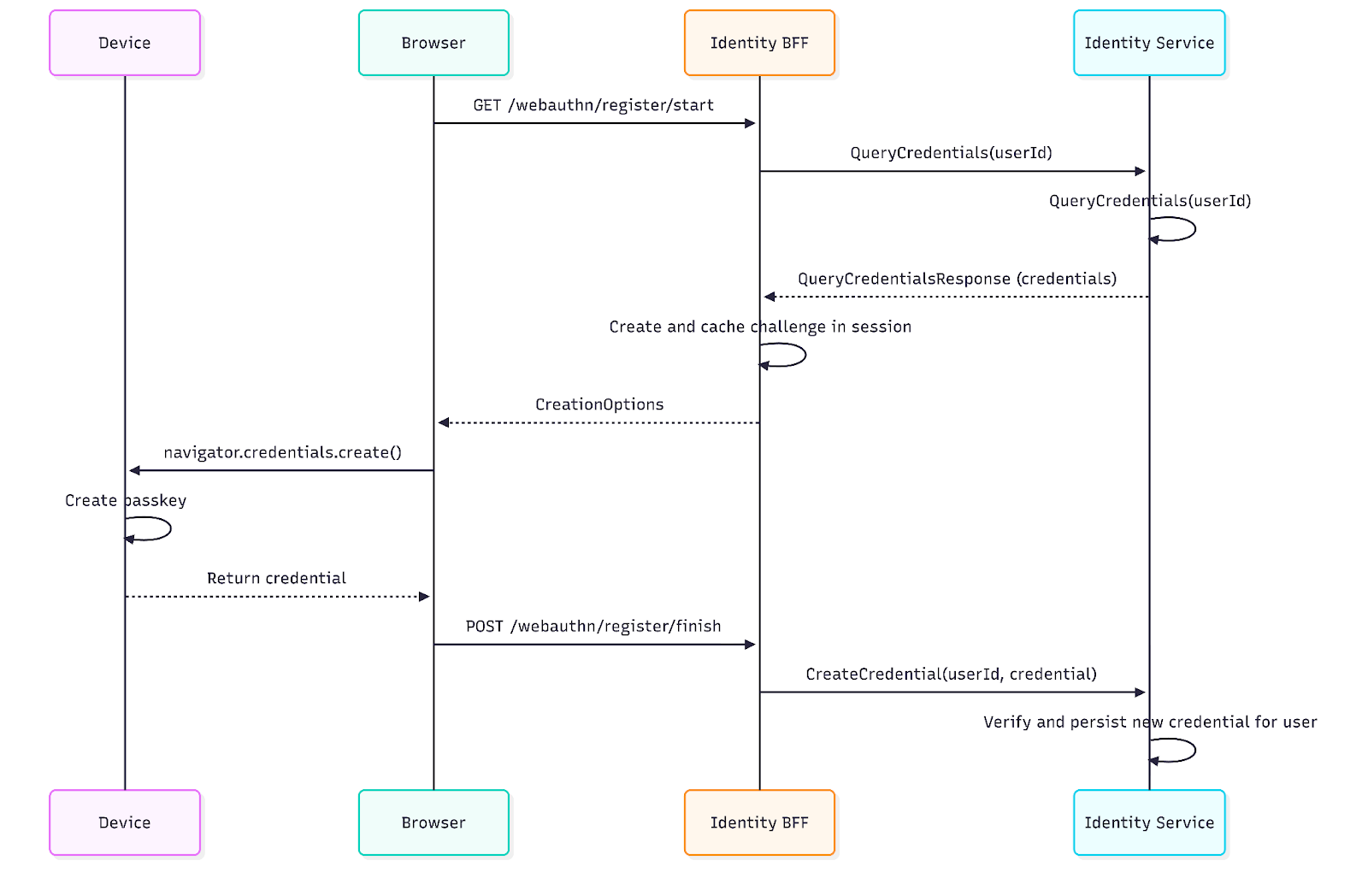
- With a valid session already established, the user initiates or is prompted for passkey registration.
- The backend performs an appropriate risk check and prompts for step-up authentication.
- The backend looks up the user’s registered credentials to populate excludeCredentials and prevent the creation of duplicates.
- The backend generates and caches a secure random challenge, then returns PublicKeyCredentialCreationOptions to the frontend, including the challenge, existing credentials to exclude, the authenticated user identity, and the registration options.
- Challenges must be generated and validated server-side for the security properties of the protocol to hold. Each challenge must be one-time use, valid for a limited duration, and produced with sufficient entropy.
- The frontend creates a passkey on the device by calling navigator.credential.create() with the provided options.
- On creation success, the response contains the passkey’s credential record, which includes its signed challenge and public key — the private key is stored securely in a hardware-based security module — that are then returned to the backend for verification and persistence.
- Don’t roll your own crypto; use a library to validate the signature and registration data. We used the FIDO2 conformant open source library WebAuthn4J.
The assertion flow, used for logging in, is similar and allows a user to prove possession of their passkey by signing the provided challenge with their private key. The server looks up the passkey’s public key and verifies the signature over the challenge and origin, among many other things. Once validated, the user is authenticated with these security benefits:
- Phishing resistance from being bound to an RP ID (relying party identifier) and origin verification.
- A passkey registered or used on attacker.com, for example, cannot be used on doordash.com.
- Public key cryptography significantly reduces exposure to brute-force, interception, credential stuffing, and credential database breaches.
- The private key resides in a hardware-based security module and is not sent to the server.
- Replay protection through high-entropy one-time use challenges.
Stay Informed with Weekly Updates
Subscribe to our Engineering blog to get regular updates on all the coolest projects our team is working on
Please enter a valid email address.
Thank you for Subscribing!
Rollout strategy
After we added passkey support to our identity and login services, we chose to introduce them gradually to avoid friction in the authentication flow and negative impact to our login funnel. Initially, we offered passkeys as an optional enhancement to optimize the user experience while monitoring success and guardrail metrics in accordance with DoorDash’s culture of experimentation.
We started with a native mobile login flow to take advantage of the preferImmediatelyAvailableCredentials option that allows a silent failure if a passkey is not locally available. This allows the system to fall back on other authentication methods without the confusing modal that prompts the user to scan a QR code when no passkeys are immediately available.
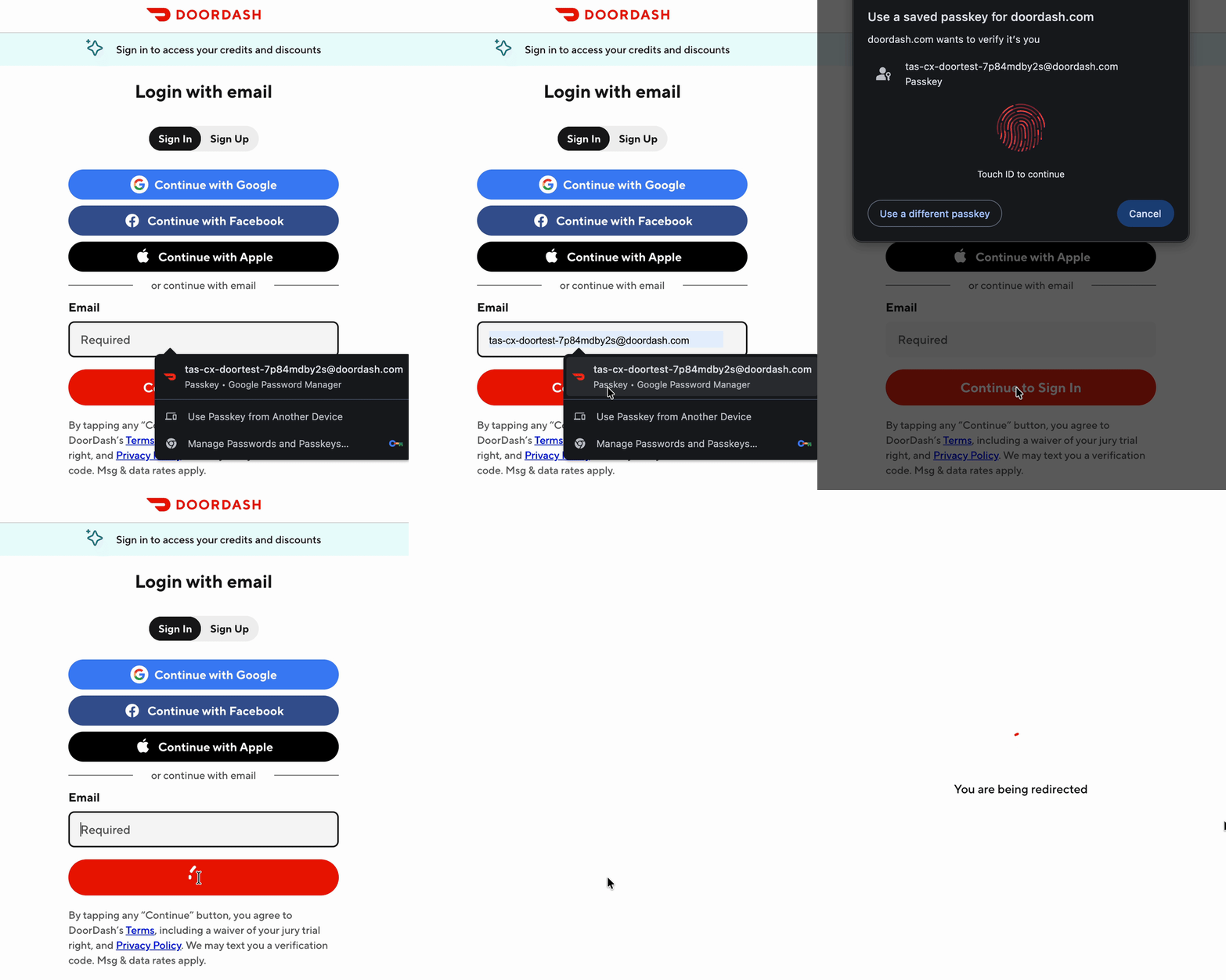
Starting with mobile first also leveraged the benefits of synchronized passkeys in password managers by making them available cross-platform with web login. While a silent failure isn’t possible if a passkey is not available locally on the web, a conditional or autofill UI can be used instead by adding webauthn to the autocomplete attribute as follows:
<input type="text" name="username" autocomplete="username webauthn">The web client would then invoke navigator.credentials.get() with the mediation parameter set to conditional, as shown in Figure 3, which returns a promise that will only resolve if a user selects a passkey. This allows us to fail silently if the user does not have a passkey or selects an alternative authentication method.
The final part of our strategy involved further adoption, which typically is driven by an upsell modal presented at various touchpoints such as post-login. This goes against our frictionless approach to initial rollout, although without upsells, only a small fraction of users would end up in account settings and an even smaller segment would create a passkey.
Passkey adoption shouldn’t depend on users navigating convoluted settings menus. We’re designing enrollment into the core login flow, so strong authentication becomes the paved path rather than an optional upgrade.
-Nick Reva, Director of Proactive Security, DoorDash
This is why we’re excited about conditional creation or automatic passkey upgrades, supported in newer versions of Chrome and Safari as well as iOS. For users who have recently logged in with a password saved in a password manager, the client can silently create a passkey for future use. In a similar fashion to the conditional autofill UI, we have the ability to invoke this capability only for eligible users on supported clients, causing minimal disruption to existing flows, as shown here:
const capabilities = await navigator.credentials.getClientCapabilities();
if (capabilities.conditionalCreate) {
  ...
  await navigator.credentials.create({
    publicKey: {/* config */},
    mediation: "conditional"
  });
  ...
}
Lessons learned
As with any new technology, there are speed bumps and edge cases with which we must contend. Below are some of the pain points we encountered and how we dealt with them.
Client-server synchronization
Certain operations can cause local passkeys to fall out of sync with the server’s credential records, causing poor and confusing user experiences. Here are some instances where this may occur:
- A user updates their account information such as username or email. On next use, their passkey displays old information.
- A user creates a passkey locally, but the finish request fails because of a network error. On next use, they will be prompted to use a passkey that is not valid.
- A user deletes their passkey from the server, but it still exists locally. On next use, they will be prompted to use a passkey that is not valid.
To resolve these issues, the WebAuthn specification added the Signal API with the following three methods:
- signalCurrentUserDetails(): This allows the server to signal an update to the user’s information like username or email.
- signalAllAcceptedCredentials(): This allows the server to send a full list of valid credential IDs so that the authenticator can hide any missing ones.
- signalUnknownCredential(): This allows the server to let the authenticator know that a specific credential should be deleted locally because it doesn’t exist server-side.
This API is now available on the newest versions of most browsers and operating systems, but with many users still behind on their updates, the next best thing is descriptive messaging to guide users to manage their passkeys in their credential manager.
Platform and browser differences
While the WebAuthn specification may be prescriptive, its implementation can vary across platforms and browsers. Without identifying these differences ahead of release and accounting for them, they can cause confusion and a degraded user experience.
When handling errors in iOS, it’s best to show a descriptive error message for situations where a passkey already exists. However, on some devices, instead of the matchedExcludedCredential error, there is an undocumented WKErrorDuplicateCredential, which can result in a generic error message and user confusion. Similarly, when a credential does not exist locally while using the preferImmediatelyAvailableCredentials option, the error thrown is canceled, a situation which is typically reserved for user cancellations of the modal. To identify this scenario, you need to inspect the error description for the text "No credentials available for login."
Another difference on iOS occurs when checking to see if a device supports passkeys using the isUserVerifyingPlatformAuthenticatorAvailable method and it routinely returns “true” for privacy reasons. This requires the app to implement additional heuristics such as canEvaluatePolicy to assess the client’s readiness.
On the web, different browsers implement the specification at different paces, or not at all. To serialize passkey assertion and registration options, PublicKeyCredentialCreationOptions and PublicKeyCredential.toJSON() can handle the encoding and formatting of binary data. However, only 85% of user agents support these options, which may leave many users unable to use their passkey. We recommend a ponyfill library to cover the gap.
Conclusion
Passkeys are a promising replacement for passwords, with many benefits for users and businesses alike, but they aren’t without rough edges. DoorDash’s initial rollout has produced positive impacts and paved the way for further expansion across all of our platforms and pillars.
Launching passkey support for our Cx application is a milestone we're proud of. Passwords have been the weakest link in digital security for decades, and replacing them is a meaningful step toward strengthening the trust our marketplace depends on. I'd encourage all of our users to make the switch — it's faster, simpler, and significantly more secure.
-Suha Can, VP & Chief Security Officer, DoorDash
If you would like to build alongside us, check out our careers page and join our Proactive Security Engineering organization!