



Mobile apps inevitably grow as products mature, teams scale, and features accumulate. Without guardrails, that growth can quietly inflate your app size to the point that it impacts users with slower downloads, lower install conversions, and degraded performance on lower-end devices. At DoorDash, we began noticing these early warning signs in both the DoorDash and Dasher apps. The natural growth trend was amplified by rapid product development, larger engineering teams, and an expanding codebase — all contributing to a steady increase in binary size. That growth happened with limited visibility into what was driving it or how to prevent regressions, making it difficult for teams to manage size trade-offs effectively. We needed a reliable, systematic way to understand what was contributing to our app size and, more importantly, how to prevent uncontrollable growth.
In this post, we share the tools, techniques, and workflows that helped us gain control of this unchecked growth. You’ll see how we identified high-impact size contributors, applied targeted optimization strategies, and built automated monitoring that ensures we won’t lose ground again. Our goal is to help anyone who builds or maintains a mobile app identify practical, proven approaches to shrink binaries today and keep them small even as a product evolves.
Why app size matters
App size isn’t just a technical metric. It directly affects a user’s ability to download, install, and use a product reliably. When someone is hungry, they want food fast — not a long download. For an app like DoorDash, even small increases in binary size can disrupt initial interactions with our product. It’s essential to keep the app lightweight to reduce friction and deliver an efficient experience from the moment a user decides to order.
By default, Apple’s App Store warns users when they attempt to download an app using cellular data that is larger than 200 MB. (See the example in Figure 1). This marks one of the clearest size-related inflection points in the mobile funnel. Once an app crosses this line, users must manually approve the download – even on unlimited plans – introducing friction and measurable dropoff in follow-through.

For most mobile teams, this effectively becomes a hard upper limit. Staying comfortably below 200 MB ensures users can install the app quickly — and without encountering warnings.
As the DoorDash and Dasher apps grew, we were trending steadily toward this boundary. The optimizations explained here stopped our apps’ upward growth trajectory and have helped us maintain a safe buffer below the 200 MB ceiling.
Lean binaries mean quicker updates, lower data usage, better performance on older devices, and fewer storage-related uninstalls. To put it bluntly: Smaller apps get downloaded more often and work better.
For apps operating at a global scale like DoorDash, these factors directly influence user satisfaction, retention, and reach, making app size controls an important and ongoing investment.
Understanding the core drivers of binary size growth
As we began investigating our apps’ sizes, we quickly discovered that most of the bloat could be traced back to three major contributors:
- Image assets
- Build optimizations
- Duplicate or unused code dependencies and third-party libraries
While each area added only incremental weight on its own, together they formed a sizable portion of our binaries. Identifying and addressing these contributors became the foundation of our optimization work.
Image and asset optimization
Images were one of the largest and most visible contributors to app size in both apps. We conducted a full audit of all bundled image assets and focused on two primary efforts:
- Optimizing large images: Many high-resolution assets were significantly larger than necessary. We resized or recompressed these images to reduce their footprint while preserving visual quality.
- Removing unused assets: As features evolve and UI flows get redesigned, image files don’t always get cleaned up. By cross-referencing asset usage in our mobile and backend codebases – and confirming impact with component owners – we safely removed over 100 unused image assets.
We also began to handle backend-driven assets with extra care. Some images may appear unused by the mobile codebase, but they are still referenced dynamically by backend systems. Before removing any such assets, we audited backend repositories and verified with the appropriate teams that the deletions would not impact runtime behavior.
These cleanup efforts alone delivered meaningful improvements. We reduced the download size of both apps by about 5%, helping us deliver faster, more seamless user experiences.
Build optimizations
Build configurations also had a measurable impact on binary size. While the specifics vary between iOS and Android, both platforms offer release-build optimizations that developers often overlook:
- On iOS, additional adjustments to the build configuration, such as stripping the binary symbols, removed unnecessary debug information from release builds and reduced the final iOS App Store package size.
- On Android, similar principles apply. Among the available resources are ProGuard/R8 configuration, code shrinking, resource minimization, and other optimizations can reduce both download and install size.
These optimizations were low-effort but high-impact.
Duplicate dependencies, unused code, and third-party libraries
Large, fast-moving codebases often accumulate duplicate dependencies or legacy modules that no longer contribute to the product. Third-party libraries are among the biggest and most easily overlooked contributors to app size. These SDKs often pull in substantial transitive dependencies, and when multiple teams adopt different solutions for the same use case, the combined footprint can grow quickly.
We saw early signs of this pattern emerging as we reviewed our own binaries. In several cases, multiple teams were using different third-party SDKs to solve essentially the same problem. After validating functionality with the teams involved, we were able to standardize on a single SDK, removing the redundant ones and reducing size without affecting user experience.
While we didn’t tackle all potential duplicate or unused dependencies during this initial optimization pass — mainly because we didn’t yet have enough concrete examples to justify a large-scale cleanup — this highlighted an important insight: It’s far easier to prevent such issues from entering the codebase than to clean them up later.
That realization led directly into the next phase of our work: Developing mechanisms to monitor and prevent duplicate dependencies, overly large additions, and other size regressions before they reach production, instead of automatically routing them to the right teams for review.
Stay Informed with Weekly Updates
Subscribe to our Engineering blog to get regular updates on all the coolest projects our team is working on
Please enter a valid email address.
Thank you for Subscribing!
Monitoring and prevention: Keeping app size under control
An initial reduction in app size is only part of the solution. As new features naturally cause an app to grow, the goal is to ensure that any growth is controlled and intentional. To sustain size management across multiple apps, teams, and release cycles, we introduced monitoring and prevention mechanisms that surface issues early, provide actionable visibility, and ensure that regressions never slip into production. These systems now act as lightweight guardrails, helping engineers make informed decisions without slowing down development velocity.
Release-over-release size alerts
DoorDash and Dasher apps ship weekly; each release includes a candidate build that goes through our standard quality assurance and verification pipeline. As part of that process, we now automatically generate a size comparison between the current production build and the one that’s getting tested. These reports are posted directly to both the Dasher and DoorDash mobile engineering Slack channels.
This simple visibility has been one of the highest-impact changes: Engineers immediately see when the next release is trending larger (or smaller), and teams can fix regressions before they reach production.
Real-time main branch monitoring and app size alerts
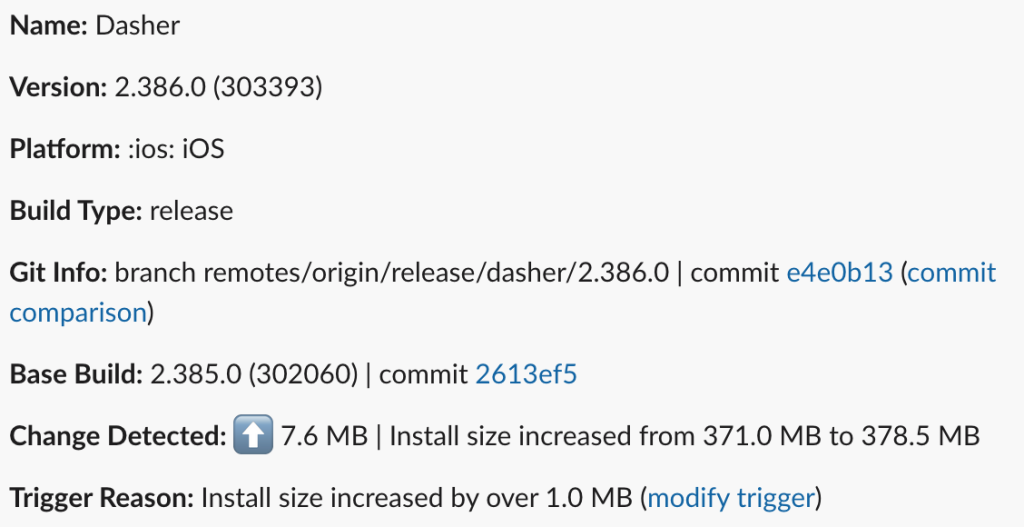
To catch issues even earlier, we added automated monitoring on every merge into our main branch. We set up a dedicated Slack channel to transmit alerts whenever the size delta between two consecutive builds crosses a configurable threshold. A sample of this can be seen in Figure 2. These alerts serve two purposes:
- When the app size increases, the alert prompts a deeper investigation. Using third-party build diffing tools, we compare the binaries to identify what changed and collaborate with pull request authors on potential ways to minimize the size impact.
- When the app size decreases, Slack alerts help us understand which changes contributed to the reduction and highlight effective optimization patterns from other teams.
This workflow prevents size regressions from quietly accumulating across merges, giving us good visibility into the health of the app size.
Pull approval groups to manage asset additions
Image assets historically have been one of the largest sources of size bloat, so we added another layer of protection: A dedicated pull approve group that must review any pull request that introduces new assets. This lightweight process helps ensure:
- New assets follow best-practice guidelines for format, dimensions, and compression.
- The asset truly needs to be shipped with the binary.
- Large or niche assets may be loaded over the network, as long as that process doesn’t degrade the user experience.
The groups provide a guardrail to keep asset growth intentional while helping engineers make informed decisions about what should live in the app bundle versus what can be delivered dynamically.
Conclusion
Keeping mobile app size under control isn’t a one-time project. It’s an ongoing discipline.
By auditing our assets, build configurations, and other potential sources of bloat, we established a cleaner baseline for both the DoorDash and Dasher apps. We shrank each app by 7% and stopped future app growth in its tracks. More importantly, by introducing automated monitoring, alerts, and review guardrails, we created a sustainable system that helps teams understand size impact early and make informed decisions.
The broader lesson is clear for mobile engineering teams: App size is a product consideration, not just a technical detail, particularly when speed matters most. It influences install conversion, update friction, performance on lower-end devices, and ultimately the reliability of the user experience. Investing in tooling, enhancing visibility, and sharing best practices ensures that growth remains intentional, not accidental.
Despite natural tendencies toward growth, app size expansion can be controlled and predictable with the right safeguards in place. Our goal isn’t to freeze the app at its current footprint, but to make sure every additional megabyte earns its place in the app’s bundle.