





In DoorDash Support, we need useful automations to give our customers and Dashers easy access to quick and complete issue resolutions.
Previously, we hand-built detailed decision trees — workflows — that allowed users to navigate through selecting options or writing free text that was then mapped to available branches. This was relatively easy to test because every change had a predictable impact; we could change a node in the tree, and then trace the branch.
When large language models (LLMs) became available, our initial exploration showed that they could achieve higher-quality resolutions than deterministic workflows could because they are more flexible and conversational, allowing them to make human-like decisions beyond the capabilities of our previous system. We described our early solution using LLMs in a previous blog post: Path to high-quality LLM-based Dasher support automation.
But using LLMs introduces a fundamental testing problem: non-determinism. LLMs vary based on sampling strategy and generation process, which means we can’t easily predict how they will respond to prompt instructions and customer inputs. Now, when we make a change such as modifying a prompt, we can't trace the future branch to understand its impact. The chatbot might handle one customer scenario better while degrading performance on another.
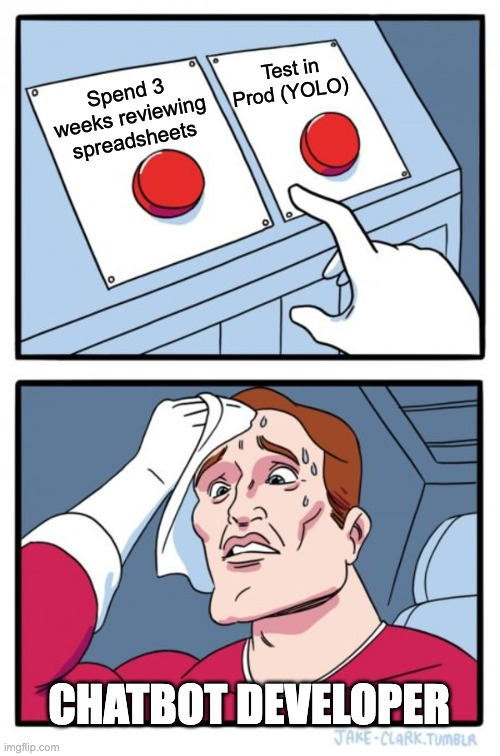
To understand the impact, we could deploy the changes to production to observe the impact in the wild, but that risks degrading the customer and Dasher experience, as illustrated in Figure 1. Alternatively, we could manually test multiple scenarios, but such a cumbersome process would create an unacceptable bottleneck and may miss problems if the testing isn't thorough.
We found that to move quickly and improve our new LLM-based systems, we need fast feedback loops without production risk. The solution is a novel testing system that enables multi-turn support conversations offline, at scale, with quality measurements built in.
Combining a simulation and evaluations
The new solution’s fast feedback and iteration loop required building two interconnected systems: An offline simulation and an evaluation framework.
The AI-driven offline simulator replicates real customer interactions. Rather than using static mock customer messages, the simulator uses LLMs to generate dynamic customer behavior, adapting in real-time to the chatbot's responses with pushback, clarifying questions, and realistic escalation patterns. It doesn't just mimic the customer; it also simulates the full conversation context, including tool calls and backend responses such as delivery status, refund decisions, and order details.
There are four major components in the simulation architecture:
- A test scenario generation pipeline that extracts behavioral insights from historical transcripts
- The simulator that plays the customer role
- Mock data that blends test and production data to cover edge cases
- An evaluation system that assesses quality at scale.
The evaluation framework uses LLM-as-a-judge as a proxy for human reviewers. Because manually reading hundreds of simulated conversations defeats the purpose of automation, we developed calibrated evaluations to match expert human judgment, enabling us to quickly assess whether a change solved the target problem and whether it degraded performance on existing success metrics.
Combined, these two systems enable a rapid iteration flywheel. When we notice a problem, we write an evaluation that captures the failure mode. We then baseline the current system; for example, it may pass 50% of test cases. We can then modify the prompt, run the simulator, and recheck the evaluation. If the pass rate in our example climbs to 60%, we know we're moving in the right direction. We subsequently iterate until we hit our exit criteria, allowing us to deploy with confidence.
In the following sections, we will:
- Introduce the flywheel with a case study
- Share how we designed and built the simulator and testing platform
- Provide greater detail about the iteration process
Rewriting the agent's memory: A case study
One of the largest changes we’ve made to date involves using the simulator and evaluator flywheel to reduce hallucinations with context engineering.
Setting up the flywheel
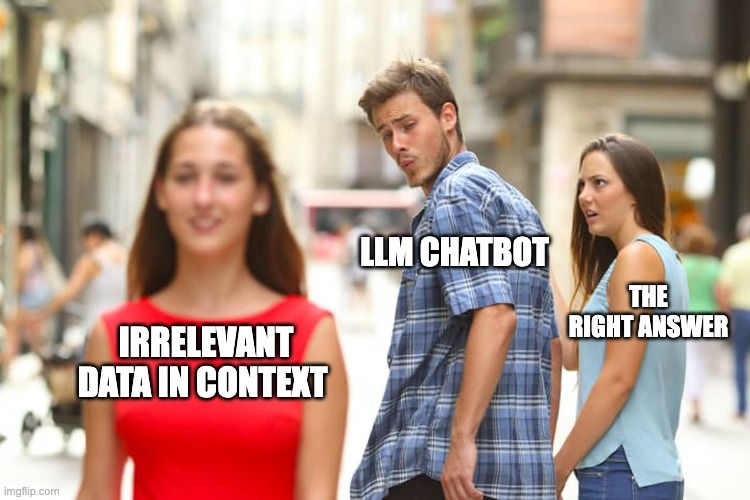
During the human reviews of our early launches, we noticed the system tended to become bogged down in the large amount of data available in the context window. This defect led to hallucinations and errors, like misinterpreting a field or suggesting a non-existent policy. We hypothesized that, while the context we provide is vital for our chatbot, this same data becomes noise when the chatbot needs to generate a response to the customer, as illustrated in Figure 2.
To kickstart the flywheel to solve this problem, we:
- Created a binary evaluation able to identify hallucinations, and
- Created a set of test scenarios from the failure cases.
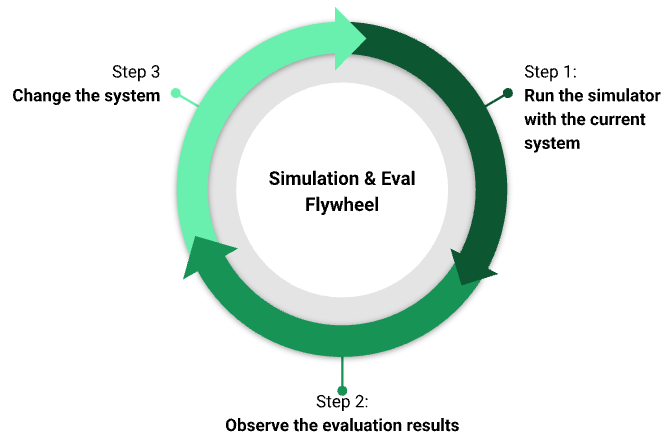
After these were in place, we used the simulation and evaluation flywheel to solve the issue, as shown in Figure 3.
Designing using the flywheel
We hypothesized that stuffing the context window with raw events and logs was overwhelming the chatbot. To correct this, we engineered a new architectural layer we called the case state that synthesizes the tool history into a structured, intermediate representation to help the chatbot communicate with the user.
Of course, we didn't perfect the case state structure on Day One. Instead, we found that if our extraction logic was even slightly off, the agent would lose context critical for driving resolutions. Some summarization attempts left out important information, causing the LLM to miss details. Others remained too noisy or poorly presented, confusing the model.
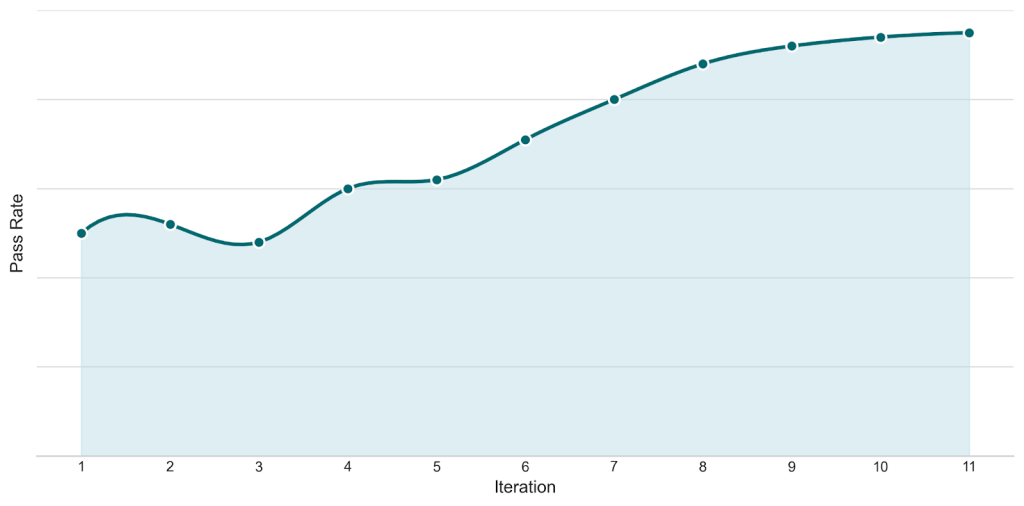
Because the simulator could generate numerous realistic conversations in minutes, we were able to test new context shapes, evaluate and identify their specific failure modes, and then iterate immediately. Using the flywheel, we experimented with dozens of context shapes and prompt strategies in a rapid feedback loop, avoiding weeks of manual trial-and-error.
Figure 4 shows the pass rate for our no-hallucination evaluation over time, demonstrating the quantifiable impact and high iteration speed that the flywheel enables.
Impact
Ultimately, we were able to reduce hallucinations in our simulations by 90%; this result carried over into production. Because this was one of the biggest changes developed with the iteration loop, the strong correlation between our offline metrics and live traffic performance told us that this system is key to building better LLM systems.
Stay Informed with Weekly Updates
Subscribe to our Engineering blog to get regular updates on all the coolest projects our team is working on
Please enter a valid email address.
Thank you for Subscribing!
Designing the multi-turn simulator
At the core of our solution is an AI-driven simulation platform designed to replicate real DoorDash customer interactions with our support chatbot. Our platform uses LLMs to generate dynamic customer behavior that adapts in real-time to the bot's actual responses, closely mirroring how actual users interact — including pushback, frustration, clarifying questions, and conversational nuance.
The platform delivers four key capabilities:
- Automated testing at scale: Generates a large volume of realistic multi-turn conversations in a few minutes
- Comprehensive coverage: Generates test scenarios based on historical production transcripts
- Early evaluation: Reviews chatbot evaluation results
- Systematic regression testing: Verifies that new changes don't break existing functionality
Let's dive into how it works.
Architecture overview
Our simulation workflow begins with a job trigger that generates test scenarios, which then run multi-turn conversations between an LLM-based simulator and the support chatbot, as shown in Figure 5. The process concludes with an automated evaluation of the support chatbot behavior.
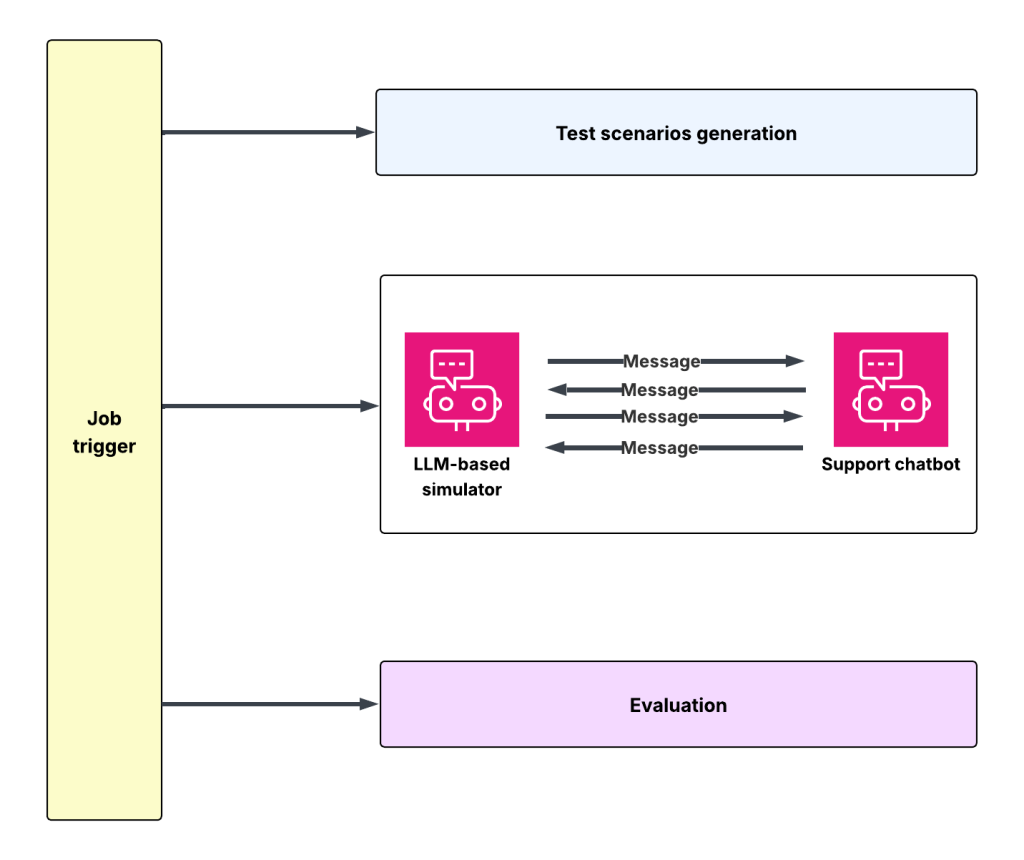
Offline test scenario generation pipeline
Everything starts with real customer support transcripts. LLMs analyze historical conversations from our database, extracting comprehensive user behavior insights, including:
- Customer characteristics — "frustrated, demanding, direct" vs. "confused, polite, patient"
- Customer story — detailed narrative of the conversation and context
- Customer intent — specific desired outcome the customer seeks, for example, to receive a full refund
This analysis transforms raw transcripts into structured test scenarios — reusable, parameterized test cases that capture the full behavioral richness of real customer interactions. We store these scenarios in an Amazon Simple Storage Service, or S3, indexed by test ID to make them accessible across our entire simulation infrastructure.
The simulator
The simulator is responsible for playing the customer's role in conversations, but it doesn’t provide simple scripted responses. Instead, it uses LLMs with detailed decision-making prompts to generate dynamic, realistic customer behavior based on test scenarios. Its core capabilities include:
- Simulation setup: Tests run on our internal load-testing infrastructure, enabling a high volume of simulations with a high number of queries per second. The simulator loads a scenario from S3 and begins the conversation by generating simulated customer messages.
- Decision and response generation: During each conversation turn (message and response), the simulator applies a structured analysis framework (e.g. whether the issue was addressed, progress made, if additional information is needed, or whether the conversation is looping) to generate the next customer response while maintaining the scenario’s personality traits.
- Realistic conversation flow: The simulator produces natural dialogue through acknowledging the bot’s answers, asking for clarification or posing follow-up questions, providing requested information, and/or expressing satisfaction when appropriate.
- Human-like escalation behavior: The system pursues realistic customer escalation patterns while adhering to the given testing scenarios. Escalation usually only occurs after repeated unhelpfulness or circular exchanges, first giving the bot several chances and continuing the conversation when progress becomes clear again.
The simulator triggers the support chatbot to produce responses, then analyzes them against the test scenario to generate the next appropriate user message. This creates smooth multi-turn conversations in which each exchange builds naturally on the previous one, enabling comprehensive chatbot testing across extended interactions.
Simulation mocking
For a simulated conversation, a chatbot often requires mock data to replay a given scenario. We support different types of mocking data, including gRPC API responses and model context protocol tool resources.
With this, we can reliably test scenarios that real systems can’t handle. Our simulation framework follows an arrange-act-assert model similar to unit testing: Scenarios define the setup, the simulator conducts a multi-turn conversation with the chatbot, and evaluators verify whether the chatbot handled the situation correctly. Mock tools return controlled responses just like unit test mock-ups, enabling predictable and repeatable conversation flows.
For added realism, we also support hybrid mocking that blends production data with scenario-specific test data. These mock-ups combine valid, current testing delivery information with historical scenario-defining details such as past order items, addresses, and issue characteristics, adjusting timestamps to preserve the original timing relationships. This approach allows us to test complex edge cases at scale while maintaining the fidelity needed for trustworthy results.
We plan to produce a more detailed blog on the simulation architecture and its evolutions. Stay tuned!
From problem to production with the flywheel
The simulator and evaluations enable a tight feedback loop. It allows us to identify a customer problem, build an evaluation that captures it, iterate on possible fixes offline, and then deploy with confidence. In this section, we'll talk through this process more generally, using an example to illustrate it in practice.
Step 1: Identify a customer problem
Because we believe our internal experts are most efficient at finding what needs to be improved, we continue to prioritize manual review of cases, either from an early simulation if we're building a new automation, or from actual users if a process has already been deployed. To support their efforts, we are exploring tools to improve issue discovery and error analysis.
From these manual reviews, we identify two key elements:
- An issue or set of issues that we want to address, and
- A set of real customer support transcripts regarding that issue to kickstart the simulator
For our case study, the problem we identified was hallucinations in which the LLM would make a mistake and behave outside of policy.
Step 2: Build an LLM-as-judge evaluation
After identifying the problem, we needed to build a calibrated evaluation to reliably identify this failure mode. It is critical that this evaluation match an expert human’s judgement, because we use the pass rate for the evaluation as our north star and exit criteria. If we can't trust the evaluation, we can't trust our iteration process.
Of course, this begs the question, as illustrated in Figure 6: Why would we trust an LLM-as-judge when an LLM caused the problem in the first place?

The answer lies in the generator-verifier gap. Acting as a full support agent involves complex decision-making across many scenarios. But verifying a single narrow behavior — for instance, did the chatbot communicate all options? — is a simpler binary task. Such straightforward tasks yield more reliable LLM performance. Additionally, the calibration process on this simple task produces definitive accuracy measures upon which we can base our trust.
We frame our evaluations as a function with three components: Inputs, a prompt, and a binary output with reasoning, as shown in Table 1.
| Inputs | Prompt: A simplified example for following policy | Output |
| - Full conversation, with tool call and response trace - Policy | Full conversation: {conversation_with_trace_json} Policy: {policy_string} Look at the full conversation with tool calls, and consider it in light of the policy. Your task is to evaluate if the chatbot correctly followed the policy. If the chatbot did not follow the policy’s steps, or provided a resolution outside of policy, respond with ‘false,’ otherwise return ‘true.’ Provide the reasoning for your decision. | - Binary label (true/false) - Reasoning (for calibration debugging) |
Table 1: Evaluations can be conceptualized as functions: Taking inputs, using a prompt, and returning an output.
Step 3: Calibrate the evaluation against human judgment
Writing the initial prompts and collecting the data is just the start. Calibration against human judgment ensures that we can trust the LLM judge.
Here is how we conduct the calibration process:
- Collect a sample of conversations.
- Label samples manually with ground truth — pass/fail.
- Run the LLM judge prompt on all samples.
- Calculate precision, recall, and F1 scores against human labels.
- Analyze reasoning for mismatches.
- Revise prompt to fix systematic errors.
- Repeat until precision and recall exceed the desired threshold.
The binary nature of the task accelerates calibration. We built an internal tool to streamline this process, reducing calibration time even more.
At the end of step, we have an LLM-as-judge that we can trust inside our simulation feedback loop.
Step 4: Iteration flywheel
Now that we have set up a simulator with test cases and an evaluation process to detect problems, we can start the iteration flywheel:
- Run the simulator on the test set to generate simulated conversations that represent the current system.
- Run evaluations against the simulated conversations and inspect the failures. It is very important to do some form of error analysis in this step to identify patterns that can be addressed. Today, we do primarily manual analysis by reading the traces, but we are exploring methods to speed this process.
- Once we identify an area for improvement, we can change the system accordingly. This might involve a prompt change or changing the results returned by the LLM tools. The simulator’s flexibility is key here; it must be able to adapt to any system changes that we make.
We can end this process after the evaluation pass rate has reached an acceptable level. For some situations, this might be 99.9% but in less serious scenarios, the exit criteria could be lower.
Step 5: Validate guardrails and deploy
Our final step before deploying involves running a final simulation against our full evaluation suite. This verifies that the chatbot maintained quality across multiple dimensions, including:
- Hallucination detection: Did the chatbot claim capabilities it doesn't have or state facts unsupported by tool responses?
- Tone assessments: Does the bot communicate naturally and empathetically?
- Issue classification: Did the bot accurately identify and classify the issue that the user had?
If no degradation is detected, and all guardrail pass rates remain stable, then we can deploy the changes into our production system via our standard A/B test. Post-deployment monitoring with the same evaluations is used to confirm the improvement held in live traffic.
Conclusion
The simulation platform and evaluation flywheel have changed how we develop and deploy chatbot improvements.
Development velocity: We reduced each iteration cycle from days to hours. Previously, testing a prompt change required either deploying to production traffic or manually testing and reviewing dozens of scenarios. Now, however, we can run more than 200 simulated conversations in under five minutes, get automated evaluation results, and iterate immediately.
Coverage: We can now test scenarios that were previously impossible to validate, including fraud cases, high-value refunds, extreme delays, and other edge cases that our existing test infrastructure couldn't handle. Our suite has grown to more than 50 evaluations.
Production stability: Post-deployment monitoring shows that improvements validated in simulation hold in live traffic, with a much lower cost for each change
The simulator and evaluation framework have given us something we never had before: The ability to move quickly on LLM-based systems without sacrificing quality or using customers as test cases.