


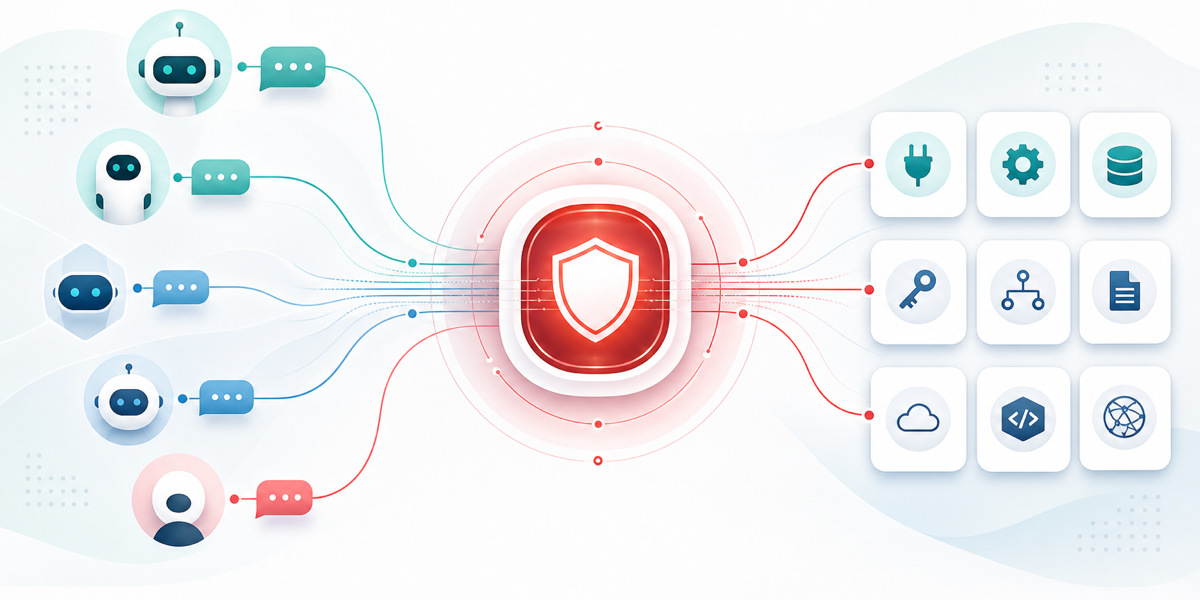
AI agents become useful when they can take action in real systems. At DoorDash, that means reaching internal APIs, engineering systems, observability platforms, ticketing systems, knowledge bases, and third-party SaaS products. The model context protocol (MCP) made those tools easier to expose by giving agents and servers a shared way to describe, discover, and invoke capabilities.
As agents moved from experiments into real workflows, we ran into a different problem. While MCP standardized the shape of a tool call, it did not answer key production questions around that call:
- Which agent is allowed to call this tool?
- Which user, team, or service is it acting for?
- Which credential should be used?
- Which subset of tools should the agent even see?
- How do we revoke access?
- How do we know what happened after the call?
These questions grow quickly. A coding agent might need GitHub, Jira, code search, continuous integration (CI), observability, and docs. A third-party MCP server might expose hundreds of tools when a workflow needs only five. A user-facing agent might need a user's OAuth grant, while team automation should use a non-personal service principal. If each team solves these issues independently, every agent-tool pairing ends up with its own auth code, OAuth flow, secret handling, tool catalog, rate limits, and logs.
That’s why we built an Agent Gateway to make agent-tool access a platform capability. It is a single governed entry point where agents discover and invoke tools. The gateway authenticates the caller, checks authorization, exposes only the approved tool surface, injects the right credential, routes to the downstream MCP server, and records a structured usage event for every call.
The gateway is not just a proxy. It is the control plane for the agent ecosystem. It governs who can call tools, curates which tools agents can see, packages tools into task-oriented surfaces, and gives DoorDash one place to observe, rate-limit, revoke, and improve agent-tool access.
Problem: Tool access has three parts
While MCP helps agents invoke tools, the harder problem in production has three dimensions:
- The first is access. The platform needs to know who is calling, whether they are allowed, and which credential model applies: internal identity, gateway-held token, per-user OAuth, or service-principal access.
- The second is tool-surface curation. Agents should not receive a raw dump of every tool exposed by downstream MCP servers. Smaller, task-relevant catalogs improve safety, reduce model confusion, and make agents easier to operate.
- The third is operations. Tool calls need rate limits, traces, metrics, usage events, cost attribution, ownership metadata, and production visibility.
Our Agent Gateway exists because access, curation, and operations belong in one shared platform, not copied into every agent and every MCP server.
Gateway architecture
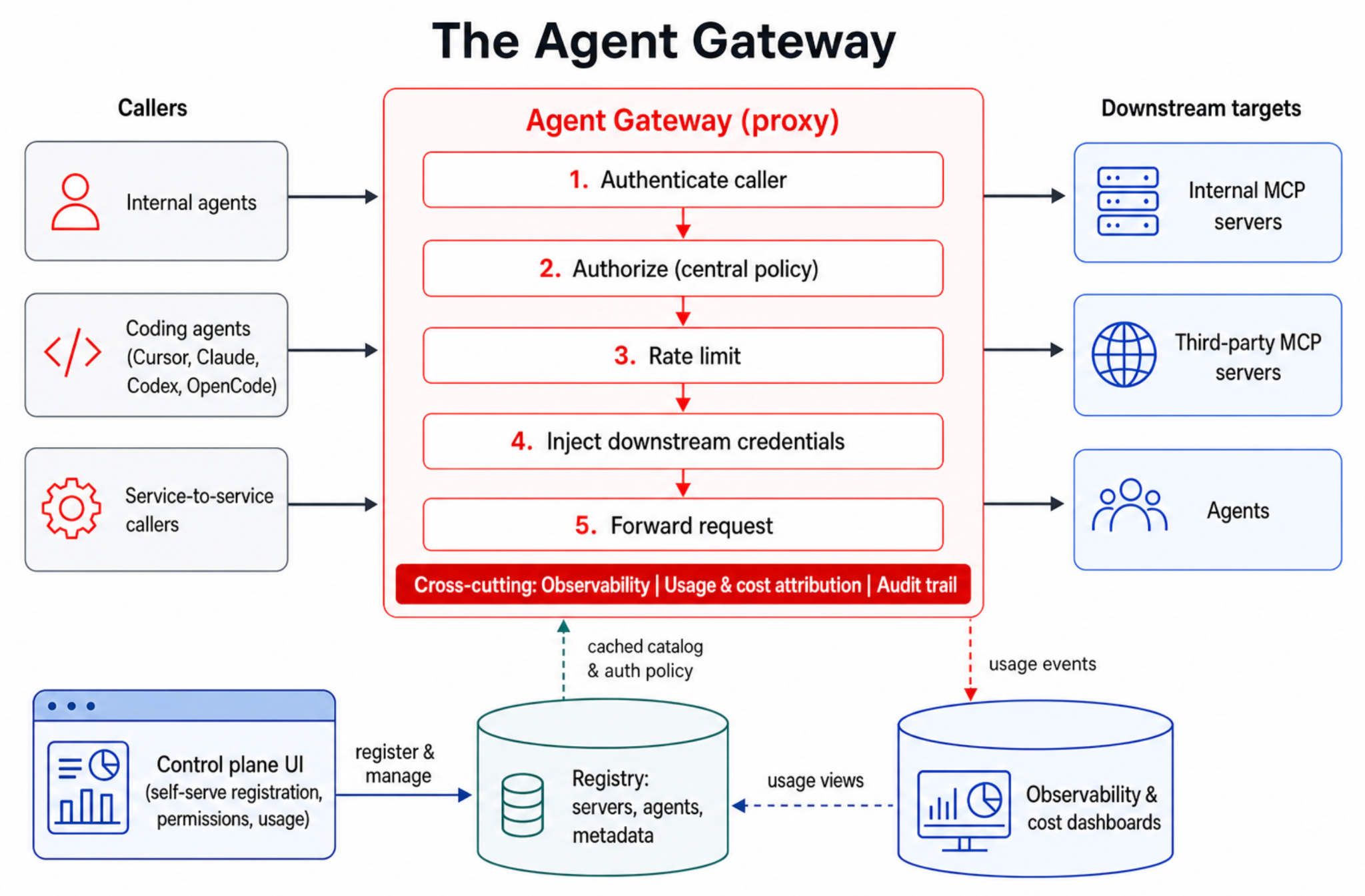
The gateway has two core pieces: a proxy and a registry, as shown in Figure 1 below. The proxy is the data plane; it receives each MCP request, authenticates the caller, authorizes the action, applies rate limits, injects credentials, forwards the request, and emits observability data. The registry is the control plane's source of truth; it stores agents, MCP servers, owners, transport configurations, auth modes, policies, discovered tool catalogs, and tool-surface configurations.
This split gives the gateway a few properties that are hard to get from point-to-point integrations:
- Agents use one consistent MCP endpoint pattern instead of learning every downstream server's auth and routing model.
- Tool owners register capabilities once, attach ownership and policy, and see production usage.
- Security teams get one place to enforce access, revoke grants, and audit calls.
- Platform teams can improve the shared path once and have every agent inherit the improvement.
We also keep internal and external trust boundaries separate. Internal DoorDash workflows and external-facing agentic use cases run through separate proxy planes with shared libraries and registry concepts. That contains the internet-facing blast radius and lets each auth model evolve independently.
Centralized identity, authorization, and secrets
Every gateway request resolves to a caller: a user, a service, or an agent acting with delegated user context. That identity is carried through authorization, credential injection, routing, and observability so every downstream action can be attributed.
The gateway checks authorization centrally. The policy questions do not stop with whether this caller can access this server. They may also be:
- Can this agent access this server?
- Can this user call this tool through this agent?
- Can this tool be exposed in this environment?
- Can this caller use a write-capable variant, or only a read-only one?
- Can this workflow use a team service principal, or does it require per-user OAuth?
Because policy lives in the gateway, DoorDash has a single place to change access and revoke it. Tool owners avoid rebuilding authorization for every server, and agent builders avoid encoding security decisions in prompts or application code.
Credential handling follows the same pattern, as shown in Table 1:
| Auth mode | Who holds the credential | What the gateway does |
| Internal service identity | DoorDash infrastructure | Forwards verified caller context to internal services |
| Gateway-held token | Gateway secret storage | Injects a vendor or service token without exposing it to the agent |
| Per-user OAuth | Encrypted per-user grant store | Injects and refreshes the user's token for user-scoped actions |
| Service principal | Gateway-managed team principal | Mints or brokers short-lived non-personal credentials |
Agents should not hold raw credentials, such as vendor API keys, OAuth refresh tokens, or borrowed human grants for team automations. The gateway keeps those boundaries explicit and auditable.
Per-user OAuth without breaking the agent turn
User-scoped third-party tools need user authorization. Reading a user's docs, filing a ticket as that user, or updating SaaS data on their behalf cannot safely use a shared key. Before we deployed the gateway, each team tended to build its own OAuth flow, token storage, and "go connect first" experience.
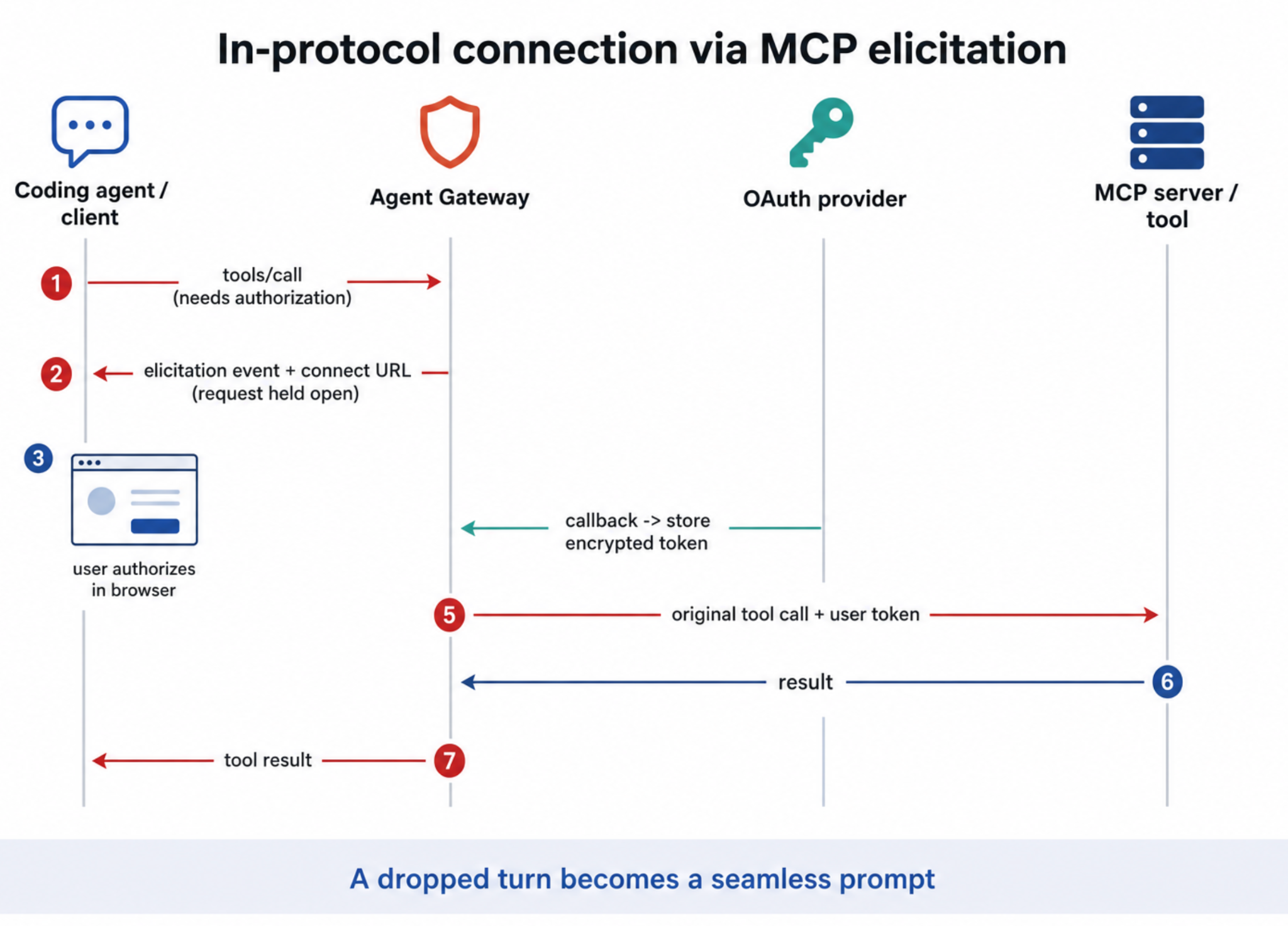
The gateway centralizes the OAuth grant. The unit of access is scoped to the agent, user, and server. On the first call that requires authorization, the gateway starts the provider's OAuth flow, stores the resulting access and refresh encrypted tokens, and injects the user's token on future calls. Agents never see the raw token.
For clients that support MCP elicitation, the gateway can pause the tool call, ask the client to show a connection prompt, and resume the original call after the user authorizes it. For clients without elicitation support, it returns a structured authorization-required response with a connecting URL, as shown in Figure 2. This turns connection from a failed turn into a recoverable part of the tool call.
Curated tool surfaces: Bundles and filtering
Agents do not naturally think in MCP servers. They think in tasks. A coding agent does not want GitHub, Jira, observability, and docs as separate setup steps; it wants the tool surface needed to investigate an issue, modify code, open a pull request, inspect CI, and understand production behavior.
At the same time, most downstream MCP servers expose far more tools than any one agent should use. Third-party servers may publish hundreds of operations, including admin actions, destructive actions, billing APIs, and niche provider-specific features. Most DoorDash workflows need only a small approved subset of these.
The gateway solves both problems with curated tool surfaces, as shown in Figure 3. Bundles combine tools from multiple MCP servers into one logical MCP endpoint. Filters decide which tools from each server are exposed for a given bundle, agent, user group, environment, or audience.
For example, a developer-tools bundle can include:
- selected GitHub tools for repository and pull-request workflows;
- selected Jira tools for issue lookup and updates;
- selected observability tools for logs, metrics, and traces;
- selected code-search and documentation tools; and
- selected deployment or feature-flag tools.
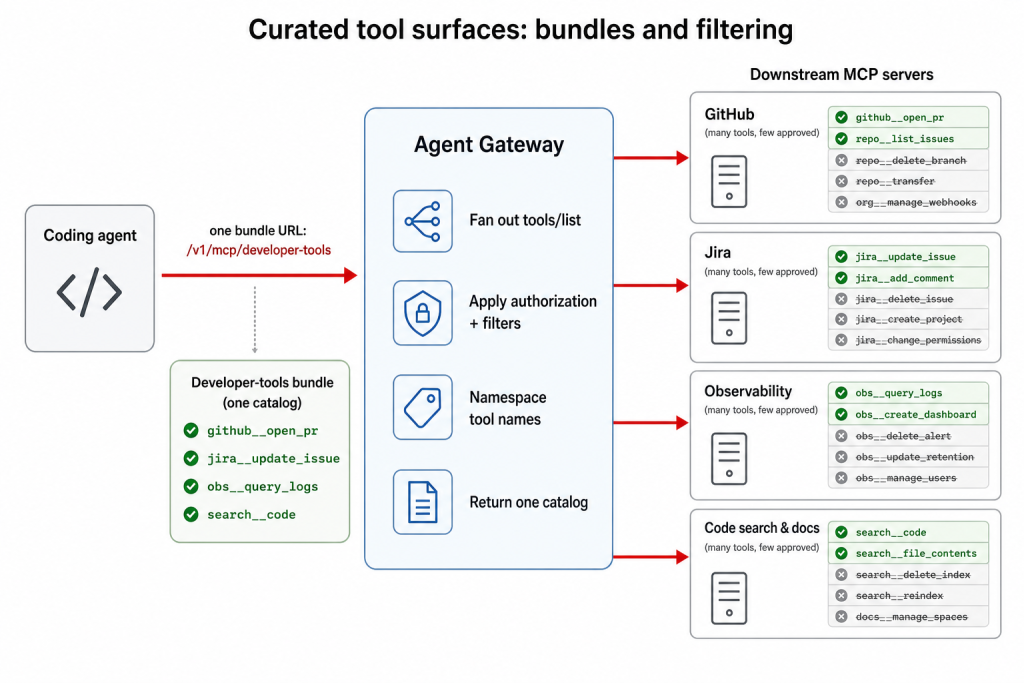
Figure 3: User experience with bundled MCP pack
The agent connects to one gateway URL, such as a developer-tools endpoint. Behind that URL, the gateway fans out tools/list across the servers in the bundle, applies authorization and tool filters, namespaces or aliases tool names where needed, and returns one coherent catalog. When the agent invokes tools/call, the gateway enforces policy again, routes the call to the correct downstream server, and applies that server's credential model.
This gives agents a product-quality interface instead of a raw dump of downstream capabilities, and includes such things as approved tools, stable names, clearer descriptions, ownership metadata, and audience-specific bundles. Engineering, data analysis, support operations, and external bundles can all use the same gateway primitives while exposing different tool surfaces.
The benefits are practical:
- Agent setup is simpler: One gateway endpoint instead of many server endpoints.
- Tool discovery is safer: Agents only see tools inside the approved boundary.
- Model behavior improves: Smaller catalogs reduce irrelevant choices and tool confusion.
- Authorization stays centralized: Discovery and invocation enforce the same policy.
This is where the gateway becomes more than an access proxy. It shapes what agents can discover, what they can call, and how much irrelevant context they carry. A curated tool surface can be the difference between an agent that picks the right tool and one that wanders through an oversized API catalog.
Observability, cost attribution, and downstream protection
Because every call flows through the gateway, each request can emit a structured event with:
- the server, tool, bundle, and owning team;
- the user, agent, service, and platform involved in the call;
- authorization result, status code, error source, and latency breakdown;
- request and response size; and
- downstream-reported cost metadata when available.
The gateway also emits metrics for request volume, per-tool latency, authorization decisions, OAuth refresh outcomes, rate-limit decisions, streaming connections, and upstream failures. Trace propagation lets teams follow a call from the agent through the gateway to the downstream server.
This has direct operational value; security can audit access, platform teams can find noisy agents, tool owners can see adoption and errors, and infrastructure teams can attribute cost.
The same point protects downstream systems. Rate limits can be scoped by server, tool, caller, user, bundle, or caller type. New limits can run in shadow mode before enforcement, showing what would have been rejected without breaking production traffic.
The gateway turns governance into data instead of relying on every team to log the right fields and enforce the right limits.
Self-serve onboarding
A gateway only works if teams prefer to use it rather than bypass it. Registration, discovery, filtering, and bundle management all must be self-serve.
Through the control-plane UI and API, teams can register MCP servers and agents, configure auth, discover tools, attach ownership, define filters, add tools to bundles, and inspect production usage.
The onboarding loop for the gateway follows these steps:
- Register the MCP server.
- Discover its raw tool catalog through tools/list.
- Select and approve the tools DoorDash wants to expose.
- Attach auth mode, ownership, and policy.
- Add the approved tools to one or more bundles.
- Watch traffic, latency, errors, authorization decisions, and cost.
Governance that requires tickets does not scale. The paved road has to be easier than copying a secret into an agent and connecting directly to a server.
What changed
The gateway gives each group a different benefit:
- Agent builders get one integration, one curated catalog, and no downstream auth, OAuth, secret handling, or per-tool routing.
- Tool owners get a managed distribution path with access control, approved tool exposure, and production usage data.
- Security teams get centralized policy, secrets, OAuth grants, revocation, and audit trails.
- Platform teams get leverage; identity, rate limiting, observability, tool quality, cost attribution, and builder experience all improve in one place.
- Agents get smaller catalogs, clearer tool names, task-oriented bundles, fewer irrelevant choices, and recoverable connection flows.
Adoption
Adoption is the real test of a platform: teams only route through it if it's easier than going direct. By that measure, the Agent Gateway has become the default path for agent–tool access across DoorDash engineering:
- More than 200 MCP servers are registered behind the gateway, together exposing thousands of tools curated into approved, task-scoped subsets rather than raw catalogs.
- More than 30 agents and services, used by thousands of employees, reach those tools through the gateway and none of them handle raw credentials.
- Millions of tool calls every week are routed through the Agent Gateway, with each one authenticated, authorized, and recorded as a structured usage event.
- Onboarding is self-serve and fast. Registering a new MCP server and its tools takes minutes, and pointing an agent at an already-registered tool is even faster.
Lessons learned
Building and scaling the gateway reshaped how we think about agent–tool access. A few lessons stand out, not just at DoorDash:
- MCP solves invocation, not governance. Identity, policy, secrets, curation, observability, and revocation become the hard parts.
- The discovered tool catalog is an interface, which means that names, descriptions, filtering, grouping, and audience matter.
- Bundles are the right unit for workflows. Agents need task-oriented toolkits, not server lists.
- Tool filtering improves both security and agent quality by exposing a smaller, clearer set of actions.
- Credentials belong in the gateway, where they can be rotated, audited, and revoked centrally.
- Missing OAuth grants are normal states, not exceptions, handling connection inside the protocol.
- The governed path must be self-serve or teams instead will go direct.
What's next
The next major investment will be in stronger agent identity and user delegation. The target model gives every agent a cryptographic identity and lets the gateway mint short-lived delegated credentials scoped to the user, agent, task, and target tool. That gives the audit trail two real principals: the user and the agent.
We are also investing in builder tooling, including quality and security report cards, checks for risky tool descriptions, detection of secrets or personally identifiable information in errors, scaffolded server creation, automatic registration, dynamic tool discovery, and redacted tool-call event streams for analytics and compliance.
Dynamic discovery continues the same theme. Instead of giving an agent every tool in a bundle, the gateway can use task context, policy, and usage signals to surface only the tools likely to be useful for the current job.
Conclusion
The Agent Gateway turns agent-tool access from repeated integration work into a shared platform capability. MCP made it easier to describe and invoke tools; the gateway makes that access governed, curated, observable, and scalable.
Acknowledgements
- GenAI Platform: Swaroop Chitlur Ruwan Geeganage Amardeep Kumar Jacob Lever Yi Lee John Dudmesh Jimmy Sindhwad
- Identity/Auth team: Brandon Mazur Chunpi Chang Gandhi Amarnadh Tadiparthi
- Traffic:Darshit Gavhane Erin Justice